How can we help?
Manage portfolios
The basic details of a Sharesight portfolio apply to the portfolio you are currently in. These settings are chosen when you create a new portfolio, and most of them can be edited later on the Settings tab.
Change your portfolio settings:
1 — From any page, click the Settings tab.
2 — Click the Details side tab.
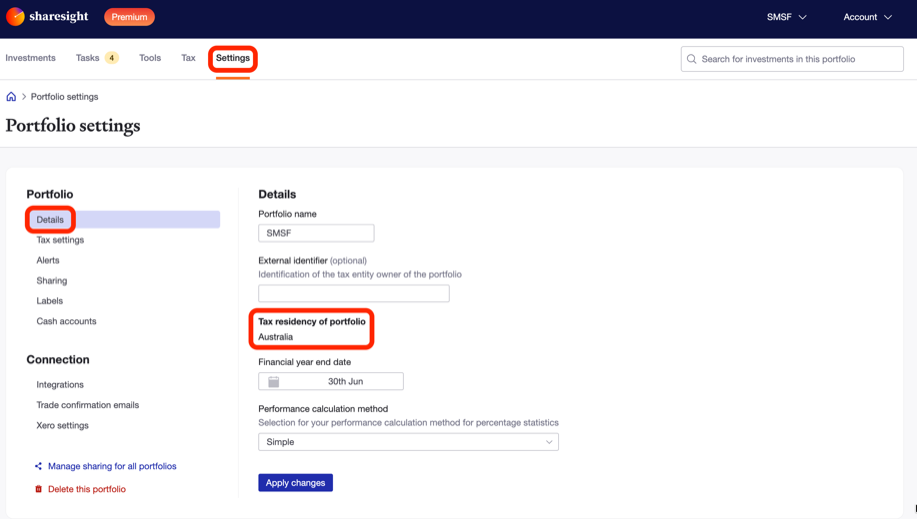
3 — Portfolio name — This is the display name used for the portfolio within Sharesight. Type in the Portfolio name field to change it.
4 — Tax residency of portfolio — This is the tax residency of your portfolio. Depending on which country you chose, it determines the portfolio currency (NZD, USD, etc.), as well as its tax and reporting functionality.
Note: The tax residency of a portfolio cannot be changed once it has been set up. This is because all data is converted to the portfolio currency and calculated according to the tax requirements of that country. Learn how to recreate a portfolio in a different tax residency.
5 — Financial year end date — Select the date on which your portfolio's financial year ends. For example, choosing 31 March as the end of the financial year means a 1 April to 31 March financial year.
6 — Performance calculation method — From the dropdown menu, select whether percentage return figures are calculated using the simple or compound method.
7 — Click Apply changes to save any changes made.
Last updated 18th November 2026