How can we help?
ETFs in Sharesight
This guide covers everything you need to know about tracking ETFs in Sharesight — from understanding how your broker holds your ETF, to entering annual tax statement components, to why capital gains can appear even when you haven't sold anything.
✅ 2025–26 tax time update: The finalised 2025–26 (FY26) tax components for auto-updated ETF providers have now been loaded into Sharesight. If you hold these ETFs, reconcile the finalised components against your Annual Tax Statement and save and confirm each distribution before you lodge.
Jump to
- How the process works (ETFs)
- How do you hold your ETF?
- Is your ETF auto-updated?
- Do I have to manually enter the tax components?
- How to enter AMIT components in Sharesight
- Why do I have capital gains on my ETF if I haven't sold anything?
- Why did each distribution amount change at tax time?
How the process works (ETFs)
ETF distributions carry tax components — a breakdown of the income into franked/unfranked amounts, capital gains, foreign income and cost-base adjustments — that you report at tax time. Here's how those flow through Sharesight across the year.
1. During the year — estimated components
For supported providers (the major issuers like Vanguard, BetaShares, SPDR and GlobalX — see Is your ETF auto-updated?), Sharesight auto-populates estimated tax components as each distribution is paid, keeping your income and reports roughly right before the finalised figures exist. Your quarterly distribution advice only shows the net distribution amount, not the component breakdown, so there's nothing to reconcile component-by-component until the annual statement arrives anyway.
Managed-fund-type active ETFs such as Loftus Peak (LPGD) aren't auto-populated — see the Managed funds AMIT guide.
2. After 30 June — the finalised Annual Tax Statement
Once the financial year ends, your fund manager finalises the actual attribution and issues an Annual Tax Statement (also called an AMMA statement). Whether — and how — you receive it depends on your broker (CHESS-sponsored, custodial, or issuer platform) — see How do you hold your ETF? below. The finalised figures can differ from the in-year estimates — the split between discounted and non-discounted capital gains, foreign income, and the AMIT cost-base increase/decrease amounts are only confirmed at this point. Statements are typically released around late August to early September.
3. Getting the finalised components into Sharesight
Whether Sharesight applies the finalised figures for you depends on your provider — see Is your ETF auto-updated?:
- Supported (auto-updated) provider → Sharesight replaces the estimates with the finalised components automatically once released (even on already-confirmed payouts). Reconcile them against your statement before confirming.
- Any other provider → Sharesight can't apply finalised figures, so you'll need to adjust and update the components manually to match your Annual Tax Statement — if your fund issues one.
See Do I have to manually enter the tax components? for which applies to you, and How to enter AMIT components for the step-by-step.
How do you hold your ETF?
Not sure how you hold your ETF? Check your broker below.
| Broker | How AU shares are held | At tax time — what to do |
|---|---|---|
| Bell Direct | CHESS (HIN) | Statement sent to you → reconcile it, or enter components manually if not auto-updated |
| Betashares Direct | ETF issuer platform | See the Betashares Direct components guide → |
| CMC Markets | CHESS (HIN) | Statement sent to you → reconcile it, or enter components manually if not auto-updated |
| CommSec | CHESS (HIN) | Statement sent to you → reconcile it, or enter components manually if not auto-updated |
| IBKR | Custodial | No statement sent to you → use the ETF issuer's tax page and enter manually |
| Moomoo | CHESS (HIN) | Statement sent to you → reconcile it, or enter components manually if not auto-updated |
| Nabtrade | CHESS (HIN) | Statement sent to you → reconcile it, or enter components manually if not auto-updated |
| Pearler | CHESS (HIN) | Statement sent to you → reconcile it, or enter components manually if not auto-updated |
| Raiz | Custodial | No statement sent to you → use the ETF issuer's tax page and enter manually |
| SelfWealth | CHESS (HIN) | Statement sent to you → reconcile it, or enter components manually if not auto-updated |
| Sharesies | Custodial | No statement sent to you → use the ETF issuer's tax page and enter manually |
| Stake | CHESS (HIN) | Statement sent to you → reconcile it, or enter components manually if not auto-updated |
| St George Securities | CHESS (HIN) | Statement sent to you → reconcile it, or enter components manually if not auto-updated |
| Superhero | Custodial | No statement sent to you → use the ETF issuer's tax page and enter manually |
| Tiger Brokers | CHESS (HIN) | Statement sent to you → reconcile it, or enter components manually if not auto-updated |
| Vanguard Personal Investor | ETF issuer platform | See the Vanguard Personal Investor components guide → |
| Westpac Online Investing | CHESS (HIN) | Statement sent to you → reconcile it, or enter components manually if not auto-updated |
CHESS-sponsored (direct broker with HIN)
You will receive an Annual Tax Statement from the share registry (e.g. Computershare, MUFG) or the ETF issuer after 30 June.
- If Sharesight auto-updates your provider → Sharesight will apply the finalised figures automatically. Do a quick reconcile: check that each tax component label matches your statement and the net distribution amount lines up.
- If Sharesight does not auto-update your provider → You will need to manually enter the components from your statement. See How to enter AMIT components below.
Custodial broker (broker holds ETF on your behalf)
If you invest through a custodial broker such as Interactive Brokers, Superhero, or Raiz, your broker holds the ETF on your behalf and you will not receive an Annual Tax Statement directly.
- If Sharesight auto-updates your provider → Trust Sharesight's finalised figures. Do a quick reconcile to confirm the amounts look reasonable.
- If Sharesight does not auto-update your provider → Refer to the ETF issuer's tax resource page on their website (e.g. Vanguard publishes a tax guide for VAS investors) and manually enter the components. Be aware that cost-base tracking in Sharesight may not be 100% accurate in a custodial structure.
ETF issuer platform (Vanguard Personal Investor or BetaShares Direct)
If you invest directly through the ETF issuer's own platform, the issuer will provide a report or statement — though the format may differ from Sharesight's Annual Tax Statement format.
- Betashares Direct → see How to enter Annual Tax Statement components for Betashares Direct.
- Vanguard Personal Investor → see How to enter Annual Tax Report components for Vanguard Personal Investor.
Is your ETF auto-updated?
Check your ETF provider below to see whether Sharesight automatically applies the finalised AMIT/AMMA tax components.
✅ Auto-updated providers
For these providers, Sharesight automatically retrieves and applies tax components once released — no manual entry needed:
- Vanguard (e.g., VAS, VGS, VDHG)
- iShares by BlackRock (e.g., IVV, IOZ)
- BetaShares (e.g., NDQ, DHHF, A200)
- VanEck (e.g., QUAL, MVW)
- GlobalX (e.g., ETPMAG, GOLD, FANG)
- SPDR — DJRE, STW, and E200 only
⚠️ Not auto-updated (manual entry required)
These funds are not included in our automatic data sync. Manually enter the components from your tax statement:
- Active ETFs & Specialist Managers: Loftus Peak (LPGD), Magellan, Hyperion, etc.
Note — LICs are different. Listed Investment Companies (LICs) such as AFIC, Argo and Milton are legally companies, not trusts. They pay franked dividends, not trust distributions, so there are no AMIT components to enter — Sharesight records their dividends automatically. (Listed Investment Trusts (LITs) are trusts and do need components entered.) See Annual Tax Statement Components.
Pro tip: Not sure which type of statement you have? Check the title. If it says "AMMA Statement" (AMIT Member Annual Statement), your fund is structured as a managed fund — see Managed funds AMIT guide. If it says "Annual Tax Statement" from a share registry, it is an ETF AMIT statement.
Do I have to manually enter the tax components?
It depends on two things: when you want to lodge your tax return, and whether Sharesight has the finalised tax data for your ETF.
Fund managers finalise their annual tax statements after 30 June, and Sharesight applies the finalised components for auto-updated providers once they're released — usually around late August to early September. Until then, Sharesight shows the estimated components it populated automatically as each distribution was paid during the year.
If you want to lodge before the finalised data is available (before ~late August / early September) → Yes, update the components yourself — but you're not starting from scratch. Sharesight has already populated estimates for each distribution, so you just adjust them to match your annual tax statement and update. Follow How to enter AMIT components below.
If you can wait, and your ETF is an auto-updated provider → No manual entry needed. Once the provider releases the finalised components, Sharesight applies them automatically. You should still double-check them against your annual tax statement before confirming — reconcile each component and the net distribution amount.
If Sharesight doesn't have finalised data for your ETF (not an auto-updated provider) → Yes, you'll need to adjust and update the components manually from your annual tax statement, no matter when you lodge.
In short: lodging early, or holding a provider we don't auto-update, means adjusting the estimates to your statement yourself. Waiting for an auto-updated provider means Sharesight fills in the finalised data — but always reconcile before you confirm.
How to enter AMIT components in Sharesight
Sharesight will correctly adjust your cost base and take AMIT components into account when running the Capital Gains Tax Report and Taxable Income Report.
- From any page, click the Tax tab.

- Click Taxable Income Report under the Tax and Compliance section.

-
From the dropdown calendar, select the date range you want to run the report for.
-
Click Advanced options.

- Select Show holding totals and click Apply.

- Click the Enter Annual Tax Statement Components button beneath the trust distribution totals.

- Enter the required fields by referring to the table below and matching them against your EOFY statement:
| # | Sharesight Component | ETF Statement Component |
|---|---|---|
| 1 | Share of net income from trusts, less net capital gains, foreign income and franked | 13U |
| 2 | Franked distributions from trusts | 13C |
| 3 | Share of franking credits from franked dividends | 13Q |
| 4 | Share of credit for TFN amounts withheld | 13R |
| 5 | Discounted Capital Gains | The total sum of all discounted capital gains from your statement |
| 6 | Capital Gains | The total sum of all other capital gains from your statement |
| 7 | Net capital gain | 18A — automatically generated as a sum of discounted and non-discounted capital gains entered |
| 8 | CGT Concession | The AMIT CGT gross up amount |
| 9 | Total current year capital gains | 18H — automatically generated as a sum of the Net Capital Gain and AMIT CGT gross up amount |
| 10 | Assessable foreign source income | 18E |
| 11 | Other net foreign source income | 20M |
| 12 | Foreign income tax offset | 20O |
| 13 | AMIT Decrease | AMIT Excess amount |
| 14 | AMIT Increase | AMIT Shortfall amount |
| 15 | Tax Deferred | Non-assessable; used to adjust your cost base for CGT purposes. Leave blank for AMITs. |
| 16 | Non Assessable | Amount of non-assessable income; reduces your reduced cost base but does not affect cost base. Leave blank for AMITs. |
| 17 | Interest | Not necessary to separate from the total unfranked value for tax purposes. If you do, reduce the unfranked amount by the interest portion. |

Form field descriptions
Use the reference below when filling in each component from your Annual Tax Statement:
Franked Amount - This value is net of the tax paid/franking credits. For AMITs this number is the total attributable franked amount minus the tax paid/franking credits and may not be displayed on the annual statement.
Unfranked Amount - Often referred to on annual statements as the Non primary production income. For AMITs you need to record the total attributable amount. Interest components can be included here for tax purposes.
Interest - It is not necessary to separate out interest from the total unfranked value for tax purposes. If you decide to do so, make sure to reduce the unfranked amount by the interest portion.
Tax Deferred - This amount is non-assessable and is used to adjust your cost base for CGT purposes. For AMITs this value should be left blank.
AMIT Decrease - Relevant for AMITs when the taxable income attributed to you is less than the cash distribution you received. This amount is non-assessable and is used to decrease your cost base for CGT purposes. This value is added to your gross amount as it represents cash received that was not attributed to you for tax purposes.
AMIT Increase - Relevant for AMITs when the taxable income attributed to you is more than the cash distribution you received. This amount is non-assessable and is used to increase your cost base for CGT purposes. This value is deducted from your gross amount as it reduces from your attributed income to the net cash amount you actually received.
Note: For AMITs that balance quarterly, you may see both AMIT Decrease and AMIT Increase components within a tax year. The difference between the two should match the AMIT value displayed on your statement.
Foreign Source Income - The gross amount of non Australian assessable income (before deduction of any tax paid/credits).
Discounted CGT - This is grossed up and included with your capital gains on the CGT report. You will often see two types of discounted gains on your statement. You need to enter the total of the two.
Capital Gains - Non discounted capital gains. This is included with your capital gains on the CGT report. You will often see two types of capital gains on your statement. You need to enter the total of the two.
CGT Concession - The amount of any CGT discount included on the statement. For AMITs this is referred to as the AMIT CGT gross up amount.
Non assessable - The amount of non assessable income. This is used to reduce your reduced cost base. It does not affect your cost base. For AMITs this value should be left blank.
TFN Withholding Tax - The amount of any Australian tax that has been deducted. This typically only occurs when your Tax File Number (TFN) has not been provided.
Foreign Tax - The amount of foreign tax paid/offset.
Franking Credits - The amount of franking credits attached to the distribution. This value will usually be found under the Tax Paid/Offsets column of the annual statement.
Other Net FSI - The amount of non Australian assessable income (before deduction of any tax credit) after offsetting any allowable expenses or losses relating to foreign source income. This value does not affect the gross amount.
Note: The 'Net Amount' and the 'Recalculated Net Amount' must be the same for the form to be correctly filled in.
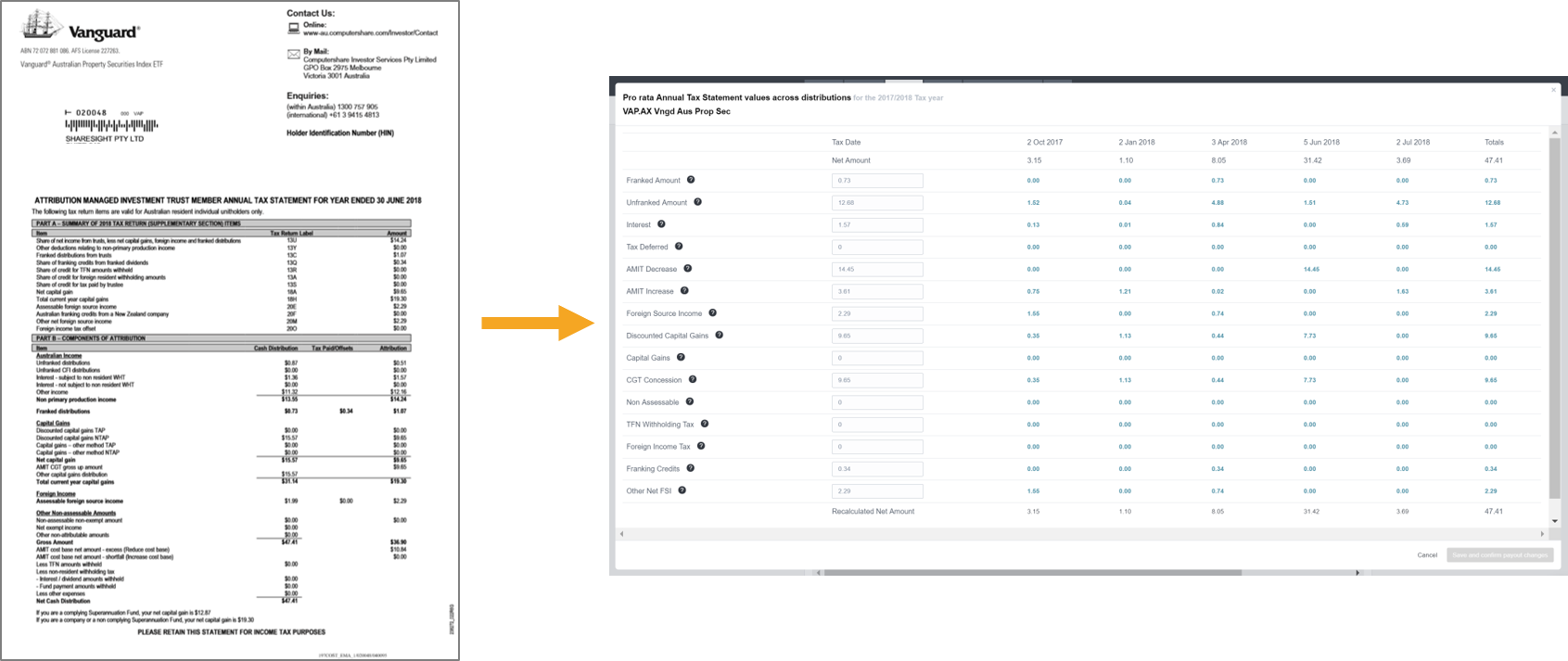
Example:
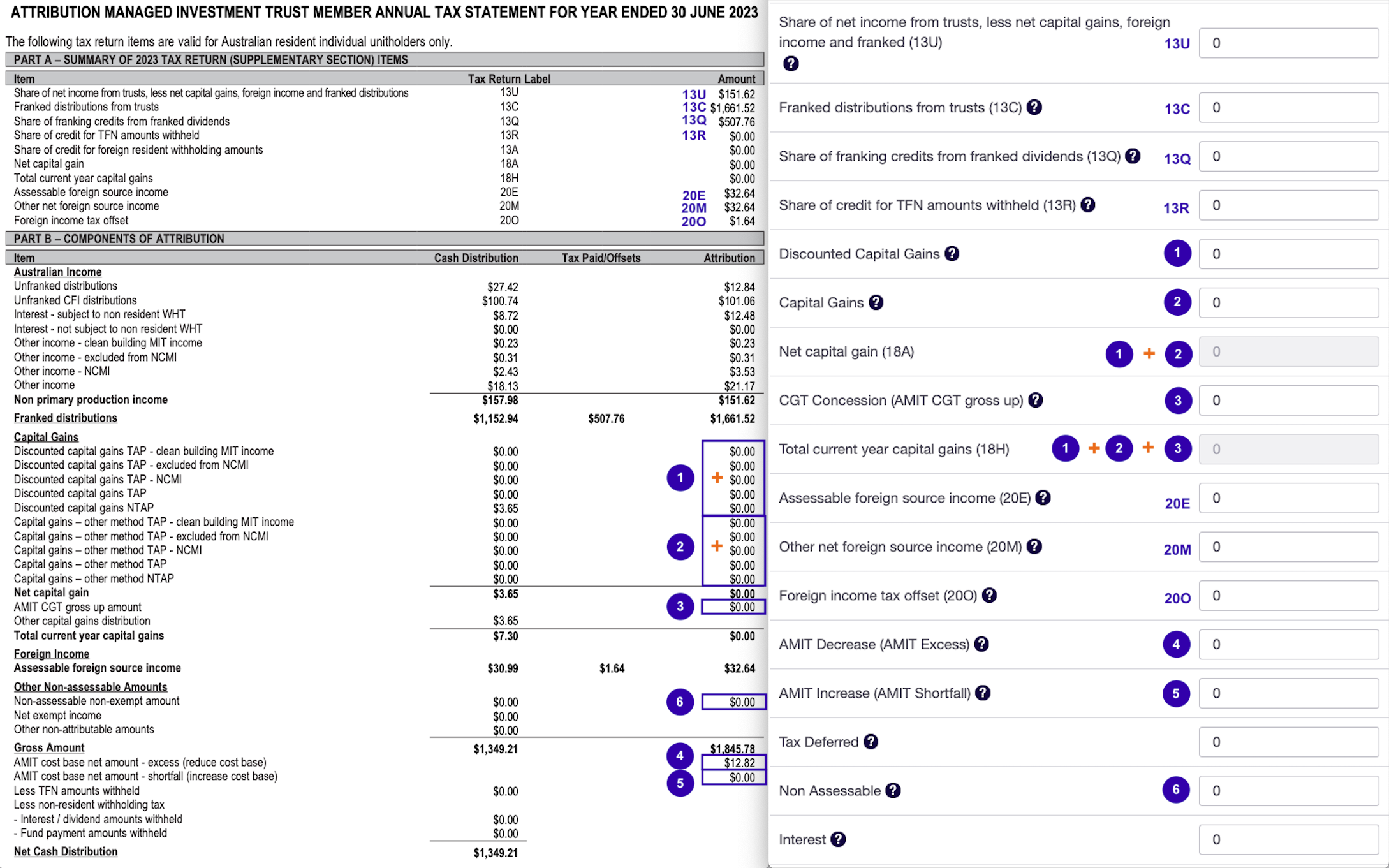
Sharesight will then calculate and pro rate the AMIT components across the distributions received throughout the year or period the trust was held.
When using the pro rata form, it is recommended to add all components. If only the AMIT adjustments are entered, the cash position and other tax components will most likely be incorrect.
- Click Save and confirm payout changes.
⚠️ You must Save and confirm. Until you save and confirm the distribution, its attributed discounted and other capital gains won't appear in your Capital Gains Tax Report — so your capital gains will be understated compared with the ATO's pre-fill in myTax. This applies whether Sharesight pre-filled the estimated components for you or you entered them manually.
Sharesight does not provide taxation advice and this report does not constitute personal taxation advice. If you have any questions about your tax position we recommend you contact your accountant or tax advisor.
Why do I have capital gains on my ETF if I haven't sold anything?
ETF providers regularly rebalance the fund's holdings to track their index — for example, adding new companies that enter the index or removing those that drop out. This rebalancing involves selling existing holdings inside the fund, which triggers capital gains events at the fund level even though you as an investor never sold your ETF units.
Under the AMIT (Attribution Managed Investment Trust) regime, the ETF is required to attribute these capital gains to investors at least once a year. This information is disclosed on your AMMA (AMIT Member Annual) statement.
These attributed capital gains are separate from any capital gains you may have from buying or selling your own ETF units. Both need to be accounted for — the AMMA statement covers the fund-level gains, while Sharesight tracks the unit-level gains from your own trades.
This distinction is all about the holding period of the assets inside the ETF. In many tax jurisdictions (like Australia), how long an asset was held determines how much tax you pay.
| Type | What it means | Tax Treatment |
|---|---|---|
| Discounted Capital Gain | ETF held underlying asset >12 months | Eligible for 50% discount |
| Non-Discounted Gain | ETF held asset <12 months | Full 100% taxed at marginal rate |
Tip: If you hold ETFs, use the Exposure Report to see the underlying holdings within your ETFs, identify overlap across multiple ETFs, and understand your true portfolio exposure.
Why did each distribution amount change at tax time?
Sometimes, after the finalised tax components replace the estimates — whether Sharesight pushed them through automatically or you entered them from your annual tax statement — the net amount of an individual distribution changes. It doesn't always happen, and where it does the change is often small (sometimes only a few cents). This is expected — here's why.
This can occur with any trust investment that pays more than one distribution a year — ETFs, managed funds and unit trusts alike. Most ETFs, for example, pay around four distributions a year. When the finalised components come in, Sharesight doesn't just update the annual totals — it re-apportions those components back across each distribution: it works out each distribution's ratio of the year's total, then spreads the finalised figures across the distributions using those ratios. Because the finalised numbers differ from the earlier estimates, the split can shift — so one distribution might tick up and another down.
The key point: the total for the financial year stays the same — only how it's allocated across the individual distributions changes. If you reconcile at the yearly level (the sum of all distributions), it will still match your annual tax statement.
Tip: To check the yearly total, run the Taxable Income Report with Show holding totals turned on — it sums all distributions for each holding so you can reconcile against your statement.
Confirming ETF distributions and finalised tax data
If you have Dividend Reinvestment Plan (DRP) set up on an ETF, you may have previously confirmed each distribution as it arrived throughout the year — this was necessary to keep your portfolio quantity accurate.
The problem arose at tax time: when Sharesight received the finalised annual tax components from your ETF provider, confirmed payouts would block the update from coming through. This meant you had to:
- Reset or unconfirm all confirmed payouts
- Wait for Sharesight to push through the finalised tax data
- Reconfirm everything again
This is no longer required. You can confirm your ETF distributions throughout the year as normal. When Sharesight receives the finalised tax components from your provider, we will automatically update the data even if the payout is already confirmed — no resetting or unconfirming needed.
Note: If you are an existing customer who was previously resetting payouts at tax time to receive finalised ETF data, you no longer need to do this. Sharesight will push finalised tax components through regardless of payout confirmation status.
Last updated 11th September 2026