How can we help?
Connect to Morningstar Investor
Connecting your Sharesight account to your Morningstar Investor account
This integration is currently only available with Morningstar Investor Australia.
Australia Morningstar Investor has teamed up with Sharesight to provide their users with Sharesight’s portfolio performance and tax reporting connected to their independent investment research, tools and insights to help investors make informed investment decisions and reach their financial goals with confidence. Read more on our blog
How to connect your Sharesight account with your Morningstar Investor account:
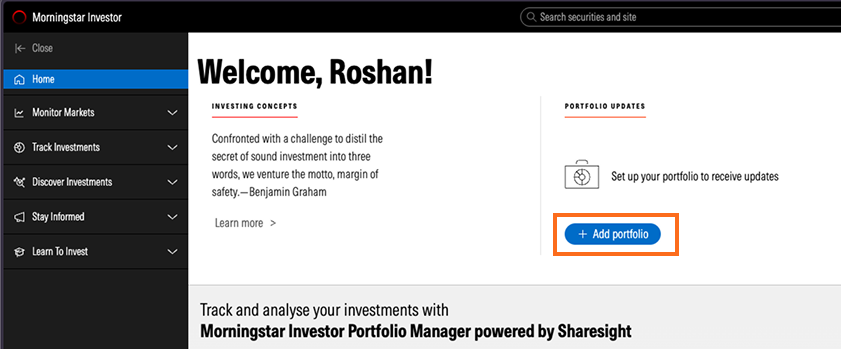
1 - Login to your Morningstar Investor account.
2 - From the Home tab, click on Add portfolio button.
3 - Signup or Login to Sharesight.
4 - Authorise access to your Sharesight account.
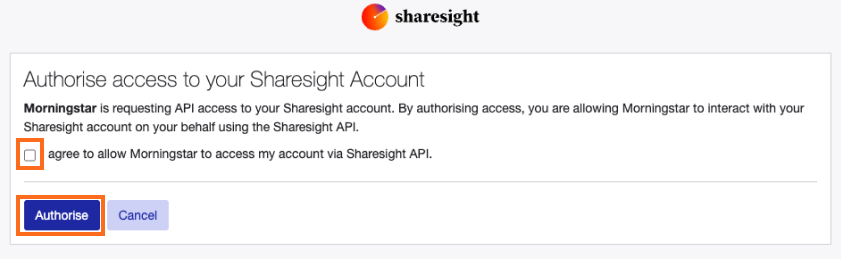
5 - Morningstar will then load your Sharesight trade data into the Morningstar Investor platform.
If you have just signed up for Sharesight to utilised portfolio performance and tax reporting, You need to click on the ‘Add investment’ button and start by adding your investment data into Sharesight.
Morningstar Investor Portfolio Investments page:
 1 - Portfolio name - this can be changed in Sharesight.
2 - Update Sharesight data button - click to update your Sharesight portfolio data in Morningstar, if you have updated the portfolio in Sharesight.
Note: This only needs to be clicked if you have not reloaded the Morningstar ‘Track investment’ or Portfoliio page since changes have been made to Sharesight.
3 - Portfolio Overview tab.
4 - X-Ray report tab.
5 - Portfolio Summary, since inception. Data pulled from Sharesight.
6 - Portfolio performance graph data ranges.
7 - Add benchmarks to the chart.
8 - Performance graph. Data pulled from Sharesight.
9 - Manage my portfolio button - click to launch Sharesight.
10 - List of holdings in the portfolio pulled from Sharesight. Linked with Morningstar’s research data and links to research holding pages.
11 - + Add portfolio - click to add an additional portfolio, this button will launch Sharesight’s add a portfolio page then you will need to add your investment data into Sharesight.
How to revoke the connection between Sharesight and Morningstar.
FAQ's
-
Is it necessary for the email addresses used for Sharesight and Morningstar to be the same in order to establish the connection?
No, you may use either the same or different email addresses for your Sharesight and Morningstar accounts. The connection can be successfully made in both situations.
-
Do I need to pay for Sharesight after linking my Morningstar account?
Once your Morningstar Investor account is linked with Sharesight, you will receive complimentary access to the Sharesight Standard plan. Therefore, no payment is necessary for your Sharesight subscription.
-
What will happen if I already have an active Standard subscription with Sharesight?
If you subscribe to Morningstar after subscribing to the Sharesight Standard plan, please contact us (Support@Sharesight.com) once the connection is established by following the steps above. A pro rata refund will be issued for your current Sharesight subscription.
-
Is it possible to upgrade to Sharesight Premium and continue to receive complimentary access from Morningstar?
Yes, you can still receive a credit for your Sharesight subscription from Morningstar when you upgrade to the Sharesight Premium plan. However, you will need to pay the difference between the Premium plan cost and the Morningstar credit, which is $17 per month.
-
Is it possible to upgrade to the Premium plan with Sharesight and pay the difference annually?
Morningstar provides credit for the Sharesight subscription on a monthly basis. Therefore, an annual invoice cannot be issued for your Sharesight Premium subscription.
-
How can I disconnect the connection?
You can revoke the connection from your Sharesight account by going to the Account > Sharesight API page within your account.
Last updated 14th July 2026